Live Platform Demo
See what you can build with Enhanced Dashboards on June 4
Register today
All Posts
/
製品情報

Unlock Granular Emissions Insights with Persefoni's Enhanced Dashboards

Share:
Article Overview

Visualization has always been one of the most important parts of working with emissions data. A well-designed dashboard can turn months of activity data into a story your team can act on and your stakeholders can easily understand.

But every sustainability team works with their data a little differently. Some need to compare emissions across business units. Others want to track facility-level trends across multiple reporting years. Reporting teams need custom views with scope and calculation detail. Executives want a clean summary they can take into a board meeting. No two reporting cycles, audits, or stakeholder conversations look exactly the same, and the default view rarely answers every question.

That is why we built Enhanced Dashboards, a native dashboard builder inside Persefoni that gives teams the flexibility to create fully custom views of their emissions data, tailored to the specific question, audience, or reporting moment in front of them.

A custom dashboard builder, built for your emissions data

Persefoni's standard analytics already give sustainability teams a strong foundation for understanding their carbon inventory. Enhanced Dashboards goes a layer deeper, giving teams the tools to build, configure, and share their own views without leaving the platform. No exports, no third-party BI tools, no manual workarounds.

You can create multiple dashboards, organize them into tabs, choose from a range of visualization types (tables, bar charts, pie charts, area charts, tree maps, and more), and configure filters at both the dashboard and individual visualization level. Once built, dashboards can be shared internally for presentations, reporting cycles, or ongoing monitoring.

The data attributes available in the builder pull directly from your CO2e Activity Ledger, covering emissions, energy, transaction data, GRI-aligned waste and water metrics, and more. That means every dashboard you create is grounded in the same trusted, audit-ready data already managed in Persefoni.

What you can build

Enhanced Dashboards is designed to flex around the work sustainability teams are already doing. A few examples of what Persefoni customers are building today:

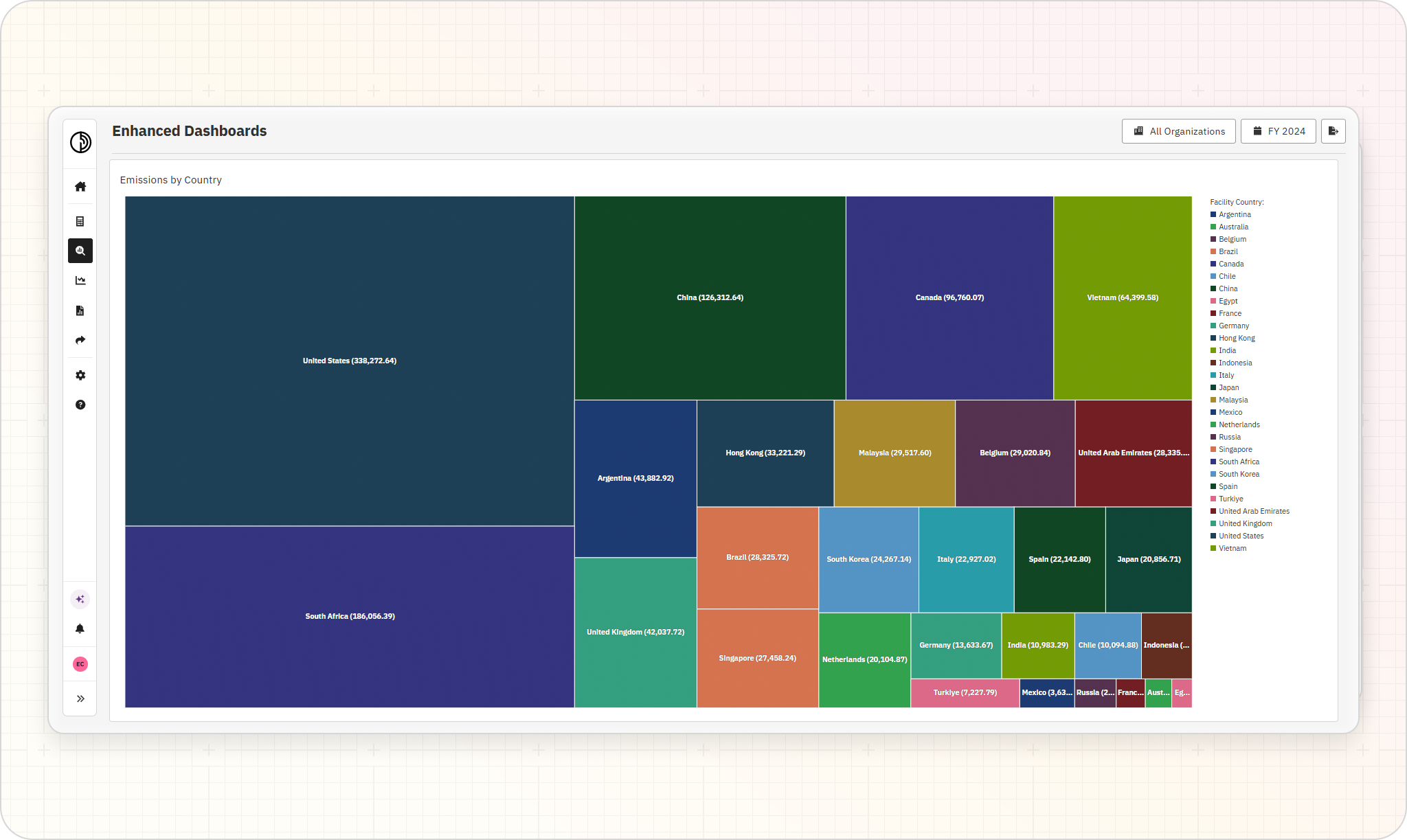
Emissions by country: Visualized as a tree map to quickly see which facilities and regions are driving the most impact across a global footprint.

Energy consumption by month and footprint source: Broken down by scope to track trends across a reporting year and surface seasonal or operational patterns.

Year-over-year emissions tables: With scope and calculation method detail, designed to support internal sense-checking, variance analysis, and audit preparation.

Facility-level comparisons across reporting years: Useful for spotting outliers, validating reduction progress, and identifying which sites need closer attention before reporting deadlines.

Key capabilities

Enhanced Dashboards is designed to put more analytical control directly in the hands of the teams closest to the data.

Core capabilities include:

A drag-and-drop dashboard builder: Build dashboards visually, with no SQL or BI experience required. Drag visualization types into the canvas and configure each one independently.

Dashboard-level and visualization-level filters: Set top-level filters (reporting year, scope accounting method, organizational hierarchy) once, then layer additional filters onto individual visualizations to show a global view alongside a country-specific view on the same page.

Multiple visualization types: Tables, bar charts, pie charts, area charts, tree maps, and more, so you can match the format to the question.

Native to the Persefoni platform: Dashboards live in your Analyze section alongside the standard views and can be updated, duplicated, or reorganized at any time. No exports, no syncing, no third-party tools to maintain.

A shared workspace for your team: Dashboards can be shared internally for presentations, reporting cycles, and ongoing monitoring, keeping everyone working from the same source of truth.

Enhancing your carbon accounting workflows with custom analytics

Carbon data is more than a number. It is a record of how your organization operates, where impact is concentrated, and where progress is being made. The more flexibly your team can interact with that data, the more value you can pull from it.

Enhanced Dashboards extends what teams can do with the emissions data already managed in Persefoni, making it easier to move from a question to a clear, shareable answer. Whether you are preparing for an audit, briefing a leadership team, comparing performance across business units, or simply trying to understand what is driving year-over-year change, you can build the view that fits the moment.

Enhanced Dashboards is available now in Persefon Advanced. Schedule a personalized walkthrough to see how custom views can sharpen your emissions analysis and help your team get more from the data they already have.

Share:
Stay Ahead with Sustainability Insights

Stay ahead of evolving disclosure requirements. Get the latest on sustainability data management, carbon accounting best practices, and regulatory-ready reporting—delivered straight to your inbox.

Related Articles

業界情報
·
Monday
May
 
18

Understanding Bilan Carbone®: France’s Carbon Accounting Framework

A business guide to understanding and applying the Bilan Carbone carbon accounting framework.
Disclosures
·
Wednesday
May
 
13

KSDS: Korea’s ISSB-Aligned Sustainability Reporting Standards, Explained

Korea’s KSDS sustainability standards will require climate disclosures starting in 2028. Learn the timeline, reporting requirements, and how to prepare.
業界情報
·
Wednesday
May
 
13

Emissions Factors: What They Are and How to Use Them in Carbon Accounting

Understand what emission factors are, why they matter, and how to select the right factors for reliable, accurate carbon accounting.